Last updated: September 29, 2026
If you've ever sent USDT on Tron and watched TRX disappear from your wallet, you've learned the hard way that USDT transfers aren't free. They need energy. The question is: how much, and what does it cost?
The short answer: a transfer to a wallet that already holds USDT needs about 65,000 energy — about 6.5 TRX if it's burned, or 3 TRX rented. A transfer to a new or zero-USDT wallet, including exchange deposit addresses, needs about 131,000 energy — about 13 TRX burned, or 6 TRX rented. That difference matters more than you'd think.
Why USDT Transfers Consume Energy?
$USDT on Tron is a TRC-20 token, which means it runs on a smart contract. When you send $USDT, you're not just moving coins you're executing contract code on the Tron blockchain.
That execution requires computational resources, which Tron calls "energy." If you don't have energy in your wallet, the network burns TRX instead to cover the cost — about 6.5 TRX for a wallet that already holds USDT, or about 13 TRX for a new or zero-USDT wallet.
Important distinction: Energy ≠ Bandwidth. USDT transfers consume energy because they interact with smart contracts. Simple TRX transfers only use bandwidth (which everyone gets for free). This is why moving TRX costs nothing, but moving USDT can burn a real chunk of TRX if you're unprepared.
Actual Energy Usage (Real Numbers)
Based on thousands of transfers, here's what you'll typically see:
Transfer to a wallet that already holds USDT: about 65,000 energy
Transfer to a new or zero-USDT wallet (including exchange deposit addresses): about 131,000 energy
The difference comes down to what the USDT smart contract has to do. Sending to an address that's never held USDT before requires extra initialization, which roughly doubles the energy cost. Network congestion can shift the exact numbers slightly, but these two figures cover almost every case.
Why the Range Matters?
Here's a real scenario that happens all the time:
You check online, see "USDT transfers need about 65,000 energy," so you rent exactly 65,000 energy. But the recipient turns out to be a wallet that's never held USDT before, so the transfer actually needs closer to 131,000 energy.
Result: You use up your 65,000 rented energy, plus the network burns the remaining ~66,000 energy worth of TRX from your wallet (about 6.6 TRX). You still saved money versus having zero energy, but you could have saved more.
This is why it's worth checking whether the destination wallet already holds USDT before you rent: 65,000 energy if it does, 131,000 energy if it doesn't or you're not sure.
What Affects Energy Consumption
Several factors change how much energy a transfer actually uses:
Receiving address status:
- New address (never held USDT before): about 131,000 energy — roughly double
- Existing address (already holds USDT): about 65,000 energy
Contract activity:
The USDT contract emits events and updates storage. More activity = slightly higher cost. You can't control this, but it explains why two identical transfers sometimes use different amounts.
Wallet software:
Some wallets add metadata or extra verification steps. TronLink, Trust Wallet, and Ledger all behave slightly differently. The differences are small (maybe 500-1,000 energy) but they exist.
Network state:
During periods of very high Tron network usage, energy costs can creep up 5-10%. This is rare but happens during major market moves or when a popular dApp launches.
None of these factors change the USDT amount you're sending, they just change the energy cost to send it.
Checking Energy Before You Send…
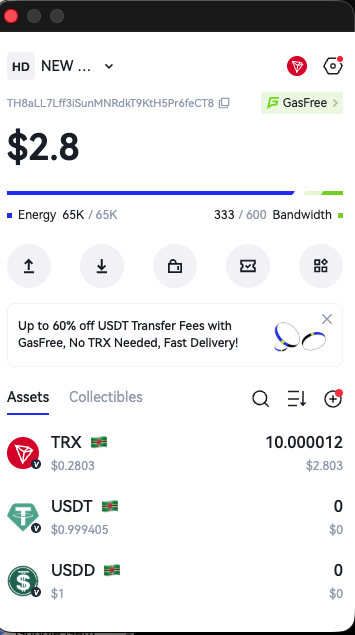
Most Tron wallets show an estimate before you confirm a transaction. In TronLink:
- Enter the USDT amount and recipient address
- Click "Send"
- Look for the transaction preview screen
- Check the "Energy" field
It'll show something like "Estimated: 65,000 energy" and whether you have enough.
If your energy balance is lower than the estimate, you'll see a warning about TRX burn. That's your signal to rent energy before proceeding.
Tip: Don't trust the estimate to be exact. It's usually within 1,000-2,000 energy of the actual cost, but I've seen it be off by more. Add a buffer.
How Much Energy to Rent (Practical Guide)
Sending to a wallet that already holds USDT: 65,000 energy
Covers the transfer without burning TRX. Costs 3 TRX to rent with EezyTron.
Sending to a new or zero-USDT wallet, or an exchange deposit address: 131,000 energy
Covers the higher initialization cost. Costs 6 TRX to rent with EezyTron.
For multiple transfers in one session: rent in multiples of 65,000 (or 131,000 for new-wallet transfers) so you don't have to stop and rent again between transfers.
For automated/business use: rent ahead in the same multiples so you're never short. Energy expires in 1 hour though, so don't rent more than you'll use in that window.
Check out the quick guide here:
Real Cost Comparison
Here's what it actually costs to send one USDT transfer on Tron (as of February 2026):
| Method | Cost | Notes |
|---|---|---|
| No energy, existing-USDT wallet (burning TRX) | about 6.5 TRX | Burned permanently |
| No energy, new/zero-USDT wallet (burning TRX) | about 13 TRX | Includes exchange deposit addresses |
| With EezyTron rented energy | 3 TRX (existing wallet) or 6 TRX (new wallet) | Over 50% savings |
| With staked TRX (frozen) | Opportunity cost of freezing TRX long-term | Good for high volume |
For most people, renting energy makes the most sense. You save over 50% versus burning TRX, and you don't need to lock up capital by staking.
If you're making 50+ transfers a day, staking becomes worth considering. But that's a separate topic.
‼️ Common Mistakes
Renting the exact estimated amount:
The estimate is just that an estimate. Always add 3,000-5,000 energy as a buffer. The difference in rental cost is negligible, but burning even 2 TRX because you were short is annoying.
Checking energy after the transfer fails:
Check your energy balance before you hit send, not after your transaction fails for insufficient resources. Failed transactions still consume some energy and waste your time.
Assuming all transfers cost the same:
Sending to a wallet that already holds USDT might cost about 65,000 energy. Sending to Binance, or to a friend's wallet that's never held USDT, can cost closer to 131,000. The contract doesn't charge a flat fee — it depends on what work needs to be done.
Renting energy too late:
Energy needs to be in your wallet before you send the USDT, not after. I know that sounds obvious, but support teams report this happens more than you'd think.
When You Need More Than the Standard Amount 🤔
Some situations require extra:
Smart contract interactions: If you're sending USDT to interact with a DeFi protocol (like providing liquidity), the energy cost can run noticeably higher because two contracts are involved.
Multi-sig wallets: Wallets requiring multiple signatures use more energy for the verification process.
Batch transfers from exchanges: When an exchange processes your withdrawal, their system might bundle operations in ways that cost more energy per transfer.
For these cases, check the wallet estimate carefully. You might need meaningfully more than the 65,000/131,000 baseline.
Or you can simply subscribe to EezyTron Plus ⭐️ and be always charged for unlimited USDT transactions.
What About Other TRC-20 Tokens?
This guide focuses on USDT because it's 90%+ of TRC-20 transfer volume. Other tokens (USDC, TUSD, etc.) behave similarly:
- USDC: a similar range to USDT
- TUSD: a similar range to USDT
- Most TRC-20 tokens: broadly comparable, contract-dependent
The USDT contract is actually one of the more optimized ones. Some random TRC-20 tokens can require noticeably more energy because their contracts are poorly written. Always check the estimate.
Should You Rent Energy Every Time?
Depends on your usage:
Occasional transfers (few times a month): Yes, rent energy each time. Way cheaper than burning TRX.
Regular transfers (few times a week): Still rent per-transfer, but consider bulk amounts if you make multiple transfers in one session.
Heavy usage (daily+): Look into staking TRX or using an energy delegation service with ongoing rental. The economics change at high volume.
One-time emergency transfer: Just burn the TRX. If you're only ever sending USDT once, the 13 TRX isn't worth optimizing.
The Bottom Line
Most USDT transfers need about 65,000 energy in practice, or about 131,000 if you're sending to a new or zero-USDT wallet, including exchange deposit addresses. Rent to match the destination and you'll rarely burn TRX unexpectedly.
Energy costs are predictable enough that you can plan ahead, but variable enough that you shouldn't cut it too close. Add a buffer, rent slightly more than you need, and your transfers will complete smoothly every time.
🚀 Ready to Save on USDT Transfers?
Rent instant energy and avoid TRX burn for your USDT transfers
Rent Energy Now