If you've ever sent USDT on Tron and watched TRX disappear from your wallet, you've learned the hard way that USDT transfers aren't free. They need energy. The question is: how much?
The short answer: most USDT transfers use between 20,000-30,000 energy. But that range matters more than you'd think.
Why USDT Transfers Consume Energy?
$USDT on Tron is a TRC-20 token, which means it runs on a smart contract. When you send $USDT, you're not just moving coins you're executing contract code on the Tron blockchain.
That execution requires computational resources, which Tron calls "energy." If you don't have energy in your wallet, the network burns TRX instead to cover the cost. Usually somewhere between 10-15 TRX per transfer, depending on network conditions.
Important distinction: Energy ≠ Bandwidth. USDT transfers consume energy because they interact with smart contracts. Simple TRX transfers only use bandwidth (which everyone gets for free). This is why moving TRX costs nothing, but moving USDT can cost $2-3 worth of TRX if you're unprepared.
Actual Energy Usage (Real Numbers)
Based on thousands of transfers, here's what you'll typically see:
Standard wallet-to-wallet transfer: 24,000-27,000 energy
First-time transfer to a new address: 26,000-32,000 energy
Transfer during high network activity: 25,000-30,000 energy
Transfer from a contract or bot: 28,000-35,000 energy
The variation depends on what the USDT smart contract has to do. Sending to an address that's never received USDT before requires extra initialization, which costs more energy. Network congestion can also bump up requirements slightly.
Why the Range Matters?
Here's a real scenario that happens all the time:
You check online, see "USDT transfers need 25,000 energy," so you rent exactly 25,000 energy. You initiate the transfer, and it consumes 28,000 energy.
Result: You use your 25,000 rented energy, plus the network burns 3,000 energy worth of TRX from your wallet (about 1.5-2 TRX). You still saved money versus having zero energy, but you could have saved more.
This is why most people rent 30,000-35,000 energy for a single transfer. Better to have 3,000 leftover than to burn TRX unexpectedly.
What Affects Energy Consumption
Several factors change how much energy a transfer actually uses:
Receiving address status:
- New address (never held USDT before): +2,000 to 6,000 energy
- Existing address: standard range
Contract activity:
The USDT contract emits events and updates storage. More activity = slightly higher cost. You can't control this, but it explains why two identical transfers sometimes use different amounts.
Wallet software:
Some wallets add metadata or extra verification steps. TronLink, Trust Wallet, and Ledger all behave slightly differently. The differences are small (maybe 500-1,000 energy) but they exist.
Network state:
During periods of very high Tron network usage, energy costs can creep up 5-10%. This is rare but happens during major market moves or when a popular dApp launches.
None of these factors change the USDT amount you're sending, they just change the energy cost to send it.
Checking Energy Before You Send…
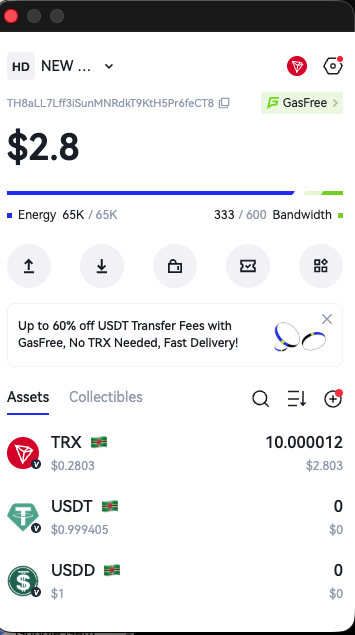
Most Tron wallets show an estimate before you confirm a transaction. In TronLink:
- Enter the USDT amount and recipient address
- Click "Send"
- Look for the transaction preview screen
- Check the "Energy" field
It'll show something like "Estimated: 26,500 energy" and whether you have enough.
If your energy balance is lower than the estimate, you'll see a warning about TRX burn. That's your signal to rent energy before proceeding.
Tip: Don't trust the estimate to be exact. It's usually within 1,000-2,000 energy of the actual cost, but I've seen it be off by more. Add a buffer.
How Much Energy to Rent (Practical Guide)
For one transfer: 30,000 energy
This covers 95% of scenarios without burning TRX. Costs about 2-3 TRX to rent.
For 2-5 transfers: 65,000 energy
Gives you room for variation between transfers. Some might use 24k, others 28k. This amount handles it.
For 10+ transfers: 130,000 energy
Bulk rental gets you a discount, and you're not stopping to rent energy between transfers.
For automated/business use: 300,000+ energy
If you're running a payment bot or processing withdrawals, you want enough to not think about it. Energy expires in 1 hour though, so don't rent more than you'll use.
Check out the quick guide here:
Real Cost Comparison
Here's what it actually costs to send one USDT transfer on Tron (as of February 2026):
| Method | Cost | Notes |
|---|---|---|
| No energy (burning TRX) | ~13-15 TRX ($2.30-$2.65) | Costs add up quickly |
| With 30,000 rented energy | ~2.5-3 TRX ($0.45-$0.55) | 80% savings |
| With staked TRX (frozen) | Opportunity cost of locking up ~500 TRX | Good for high volume |
For most people, renting energy makes the most sense. You save about 80% versus burning TRX, and you don't need to lock up capital by staking.
If you're making 50+ transfers a day, staking becomes worth considering. But that's a separate topic.
‼️ Common Mistakes
Renting the exact estimated amount:
The estimate is just that an estimate. Always add 3,000-5,000 energy as a buffer. The difference in rental cost is negligible, but burning even 2 TRX because you were short is annoying.
Checking energy after the transfer fails:
Check your energy balance before you hit send, not after your transaction fails for insufficient resources. Failed transactions still consume some energy and waste your time.
Assuming all transfers cost the same:
Sending to Binance might cost 26,000 energy. Sending to your friend's new wallet might cost 30,000. The contract doesn't charge a flat fee but it depends on what work needs to be done.
Renting energy too late:
Energy needs to be in your wallet before you send the USDT, not after. I know that sounds obvious, but support teams report this happens more than you'd think.
When You Need More Than 30,000 Energy 🤔
Some situations require extra:
Smart contract interactions: If you're sending USDT to interact with a DeFi protocol (like providing liquidity), the energy cost can be 35,000-50,000 because two contracts are involved.
Multi-sig wallets: Wallets requiring multiple signatures use more energy for the verification process.
Batch transfers from exchanges: When an exchange processes your withdrawal, their system might bundle operations in ways that cost more energy per transfer.
For these cases, check the wallet estimate carefully. You might need 40,000-50,000 energy instead of the standard 30,000.
Or you can simply subscribe to EezyTron Plus ⭐️ and be always charged for unlimited USDT transactions.
What About Other TRC-20 Tokens?
This guide focuses on USDT because it's 90%+ of TRC-20 transfer volume. Other tokens (USDC, TUSD, etc.) behave similarly:
- USDC: 23,000-29,000 energy
- TUSD: 24,000-30,000 energy
- Most TRC-20 tokens: 20,000-35,000 energy range
The USDT contract is actually one of the more optimized ones. Some random TRC-20 tokens can require 40,000+ energy because their contracts are poorly written. Always check the estimate.
Should You Rent Energy Every Time?
Depends on your usage:
Occasional transfers (few times a month): Yes, rent energy each time. Way cheaper than burning TRX.
Regular transfers (few times a week): Still rent per-transfer, but consider bulk amounts if you make multiple transfers in one session.
Heavy usage (daily+): Look into staking TRX or using an energy delegation service with ongoing rental. The economics change at high volume.
One-time emergency transfer: Just burn the TRX. If you're only ever sending USDT once, the 13 TRX isn't worth optimizing.
The Bottom Line
Most USDT transfers need 25,000-28,000 energy in practice, but you should rent 30,000-35,000 to be safe. The extra buffer costs maybe 0.5 TRX and prevents your transfer from burning TRX unexpectedly.
Energy costs are predictable enough that you can plan ahead, but variable enough that you shouldn't cut it too close. Add a buffer, rent slightly more than you need, and your transfers will complete smoothly every time.
🚀 Ready to Save on USDT Transfers?
Rent instant energy and avoid TRX burn for your USDT transfers
Rent Energy Now